Connect Claude or ChatGPT to Purands, and your AI app drafts email campaigns inside your store's account, in your brand voice, with your real products. Everything it makes is a draft.
It can't send, schedule or delete anything, create discount codes, or see individual customers. A person on your team reviews, schedules and sends every campaign.
- The Purands AI connector lets your AI app work inside Purands, with your brand voice, your email rules and your store's real products.
- The guardrails are the feature: drafts only, no discount codes, totals instead of customers, your own login, and every action recorded.
- It works today with Claude, Codex in the ChatGPT app and other MCP apps, and it comes with every Purands plan.
Why do AI-written emails go wrong when you copy and paste them?
If you write campaign emails in Claude or ChatGPT today, you probably paste the text into your email tool afterwards. Three things slip on the way.
- The voice drifts. The chat doesn't know your brand voice or your email rules unless you paste them in every time.
- Product facts get guessed. It doesn't know today's products, prices or links, so it fills the gaps.
- Nothing checks the email. A broken link or a missing unsubscribe link reaches your list unless someone catches it.
The Purands AI connector turns that around. Instead of copying text out of your AI app, your AI app works inside Purands, whether you sell skincare, pet care or anything else.
What guardrails does Purands put around your AI app?
The first question store owners ask is what stops the AI from doing something it shouldn't. These limits come from Purands itself, not from the AI app's judgement.
- Drafts only. It writes email drafts and prepares campaign drafts. It cannot send or schedule campaigns, publish automatic emails, or delete anything.
- No discount codes. It can't create or turn on a discount code. Your team adds a code to a campaign in Purands, if there is an offer.
- Totals, not people. It sees counts and totals, never individual customers, orders, chats or segment members. A number under 5 shows as "fewer than 5", and segment previews are rounded.
- Your login, your role. Each person connects with their own Purands login, after an Allow screen that lists what the app may and may not do. It can do no more than that person's role allows.
- Every action recorded. Purands logs every call an AI app makes, and your admins can see the activity under Integrations › AI apps. Every change to an email is saved as a version you can restore, and your admins get an email when someone connects an AI app.
- Off when you say. Disconnect an app under Integrations › AI apps and Purands stops answering it at once. A connection also ends after 90 days unused.
The full list, with every tool the AI app can use, is on the AI connector page.
What do you see before you let an AI app in?
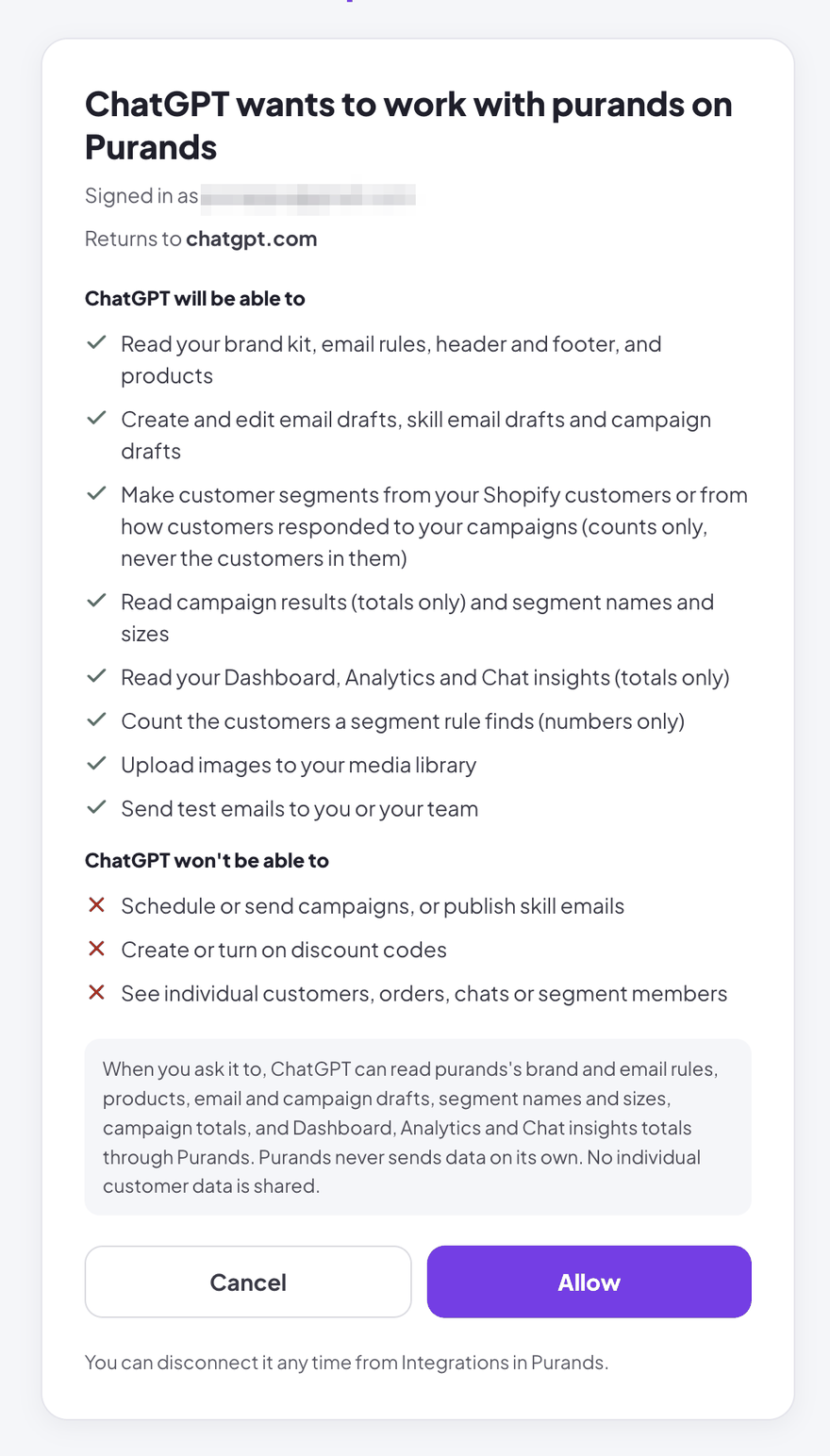
When you connect, Purands shows an Allow screen. It names the company, who is signed in, where the app will return to, and what the app may and may not do. Nothing happens until you click Allow.
What does writing a campaign with your AI app look like?
Three requests show the range. Each one starts in a normal chat in your AI app.
1. A restock email for your bestsellers
You ask: Using Purands, write a restock email for our three bestsellers.
- Your AI app reads your brand voice and your email rules from Purands.
- It finds your three real bestsellers in your store's catalogue. Purands fills in each picture, price and link, so the AI never types a price.
- It saves a designed draft on your Emails page and shows you a preview. Claude shows it right in the chat; apps that can't show it give you a link.
- Your team reviews the draft, changes anything in the editor, and schedules it.
2. A follow-up for people who clicked but didn't order
You ask: Make a segment of people who clicked our last campaign but didn't order, and draft a follow-up.
- Your AI app first counts who matches, as a rounded number, so you can decide whether it's worth it.
- It makes the segment from how customers responded to that campaign: clicked, did not order, within the last few days.
- It drafts the follow-up email and a campaign draft for that segment, with its estimated reach.
- A person on your team checks the campaign in Purands, adds an offer if there is one, and launches it.
3. How the last 30 days went
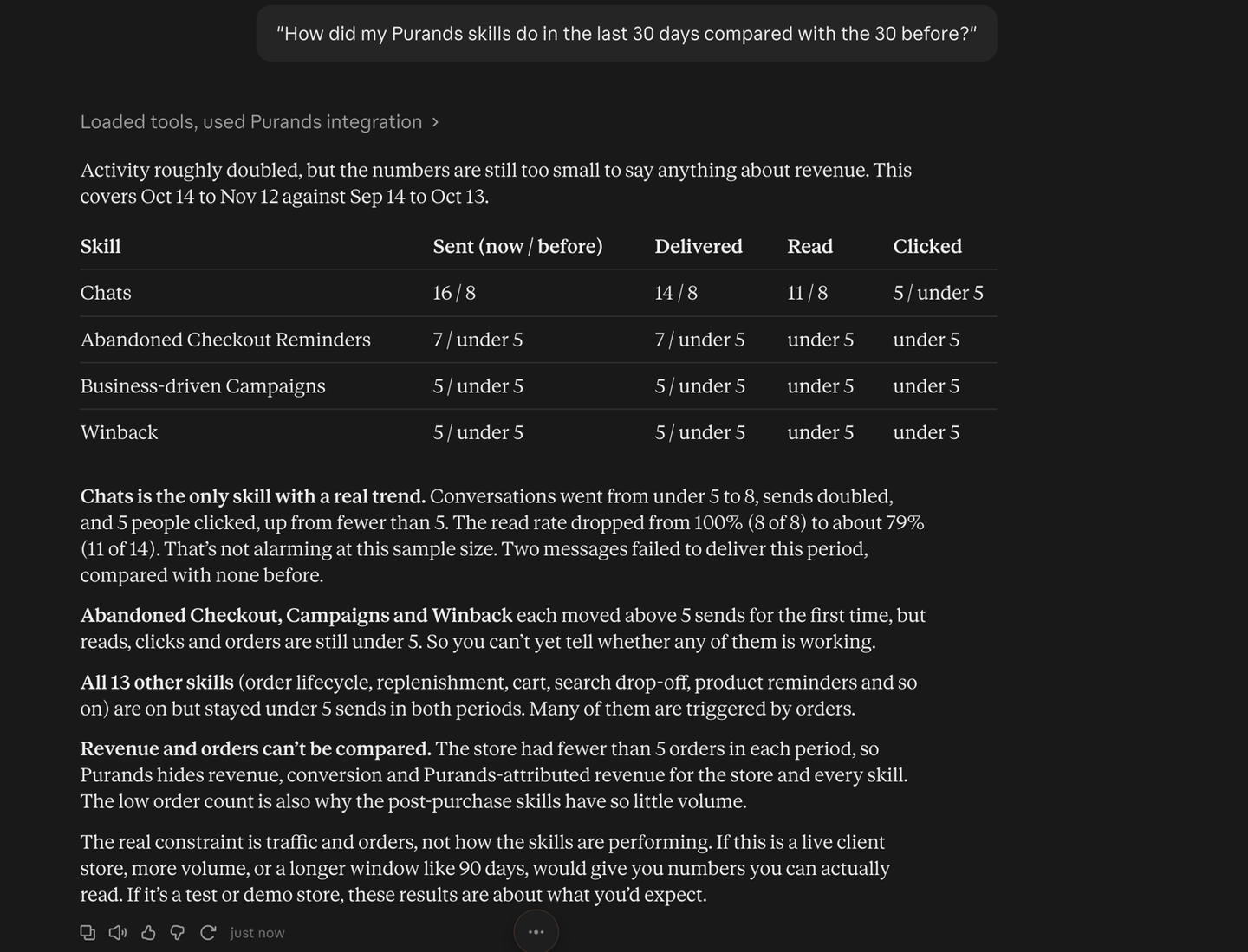
You ask: How did my Purands skills do in the last 30 days compared with the 30 before?
Your AI app answers with totals from Purands: sent, delivered, read and clicked for each automatic message, with small numbers shown as "under 5". It never lists individual customers.
Which AI apps work with Purands today?
- Claude on the web, desktop and mobile, and in Cowork
- Claude Code
- Codex in the ChatGPT app
- Cursor, VS Code and Gemini CLI
- Other apps that support remote MCP servers
ChatGPT itself can add Purands as an app on plans that allow custom apps, usually Business or Enterprise, and a workspace admin may have to allow it. The steps for each app are on the AI connector page.
What does the AI connector cost?
Nothing extra. The AI connector is included in every Purands plan. Your AI app is billed by its own provider, under your plan with them. See pricing.
How do you start?
Already on Purands? Open Integrations › AI apps and click Add to Claude, or follow the steps for your app on the AI connector page. Then ask for your first email.
New to Purands? Book a demo and we will show you the AI connector working with your own products.